In e-commerce, communication is not a secondary detail. It is part of the buying experience. A customer places an order, completes a payment, waits for confirmation, expects updates and wants to know that everything is moving in the right direction. When this communication is slow, unclear or missing, the store owner usually pays the price through support requests, uncertainty and lower customer trust.
For WooCommerce store owners, email is often the default channel for order communication. It works, it is familiar and it is already part of the WordPress ecosystem. But email is not always the fastest or most visible way to reach a customer. Messages can end up in spam, be ignored, arrive late or simply disappear among dozens of other notifications. This is why SMS still has a practical role in online commerce: it is direct, short, immediate and easy to understand.
MyOwnSMS was created around a simple but powerful idea: allowing a WooCommerce merchant to send SMS messages using their own Android phone as the sending device. Instead of relying only on a traditional external SMS gateway, the store can connect WordPress and WooCommerce to an Android device controlled by the merchant. This creates a more direct sending setup, especially useful for businesses that want to manage their SMS operations with a clear link between store, license, domain and authorized device.
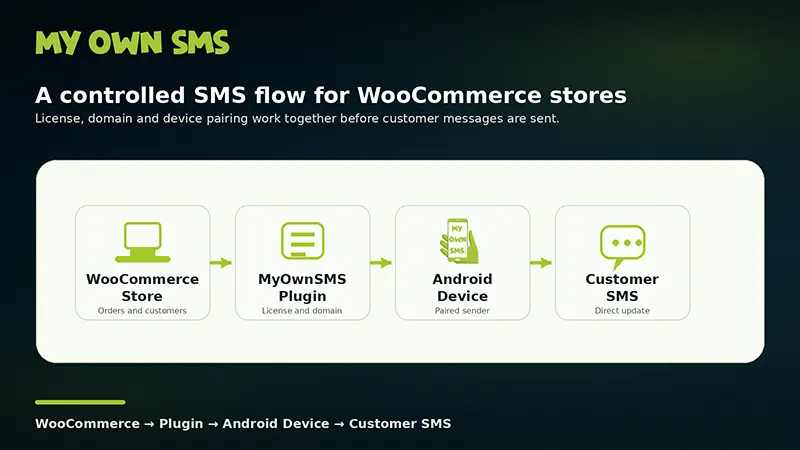
The concept is straightforward. The merchant installs the MyOwnSMS plugin on the WooCommerce website, activates the license, connects the store domain and pairs an Android device through the app. Once the system is correctly configured, WooCommerce can use that setup to manage SMS communication according to the available features and the store’s operational needs.
This model is especially interesting for small and medium-sized stores that want to add SMS notifications without building a custom infrastructure. Many merchants do not want to deal with complex API integrations, developer-heavy configurations or external platforms that feel detached from their daily workflow. They want something that works inside their existing WooCommerce environment and uses a device they control.
The Android phone becomes part of the store’s communication system. For this reason, it should not be treated like a casual personal device. A reliable SMS setup works best when the phone is stable, connected, protected and dedicated to the task. A merchant should think of it as an operational device, not simply as a smartphone sitting on a desk. Network stability, correct time settings, battery management and device security all contribute to the quality of the service.
The real value of this approach becomes clear when we look at everyday WooCommerce scenarios. A customer places an order and receives a confirmation by SMS. Another customer receives an update when the order changes status. A local store can send a short message when a product is ready for pickup. A merchant can reduce repetitive “Where is my order?” requests by giving customers timely information before they need to ask.
SMS is not meant to replace every other channel. It should not be used to send long explanations, heavy promotional content or messages that would work better by email. Its strength is precision. A good SMS is short, useful and sent at the right moment. For WooCommerce, this means focusing on moments where immediacy matters: order confirmation, payment updates, shipping information, pickup notices, delivery reminders or selected promotional campaigns when the proper consent is in place.
This distinction is important. Transactional SMS and marketing SMS are not the same thing. A message related to an order has a different purpose from a promotional campaign. Store owners should use SMS responsibly, making sure that marketing communication is based on the correct customer preference and consent where required. A serious SMS system should not encourage random mass messaging; it should help the merchant communicate better, with more control and more awareness.
From a business perspective, SMS notifications can improve the customer experience because they reduce uncertainty. Customers do not always need long conversations with support. Very often, they simply need to know that the order was received, that the payment was processed or that the package is moving. A short message at the right time can prevent confusion and make the store feel more professional.
For the merchant, this can also mean better operational efficiency. Every unnecessary support request takes time. Every unclear order status creates friction. Every missed communication weakens the relationship between the store and the customer. SMS helps solve a very practical problem: it keeps the customer informed before the customer feels the need to chase information.
Using your own Android phone for WooCommerce SMS notifications also gives the merchant a different sense of control. The sending device is part of the merchant’s environment. The license is associated with the store domain. The device must be paired and authorized. This structure creates a controlled operating model where the website, the license and the Android app work together as a single system.
For store owners who already use WooCommerce, the advantage is clear: they can add a direct SMS communication layer without changing the foundation of their e-commerce setup. WordPress remains the central environment, WooCommerce remains the sales engine and the Android device becomes the operational SMS sender.
The best way to approach SMS is not to think of it as a technical feature, but as a customer experience tool. The question is not only “Can my store send SMS?” The better question is: “Which customer moments deserve a fast, direct and reliable message?”
When used with this mindset, SMS becomes more than a notification. It becomes a small but important part of the trust relationship between the store and the customer.
MyOwnSMS is designed for merchants who want this kind of control: a WooCommerce-focused SMS solution that connects the store to an authorized Android device, supports operational communication and gives the business a more direct way to manage customer messaging.
For stores that depend on timely updates, local operations, order communication or direct customer contact, sending WooCommerce SMS notifications through your own Android phone can be a practical and efficient way to make communication faster, clearer and more reliable.